Manage Points
Managing your ODude Points is simple and transparent. You can track every transaction and easily share points with other users in the ecosystem.
Point History
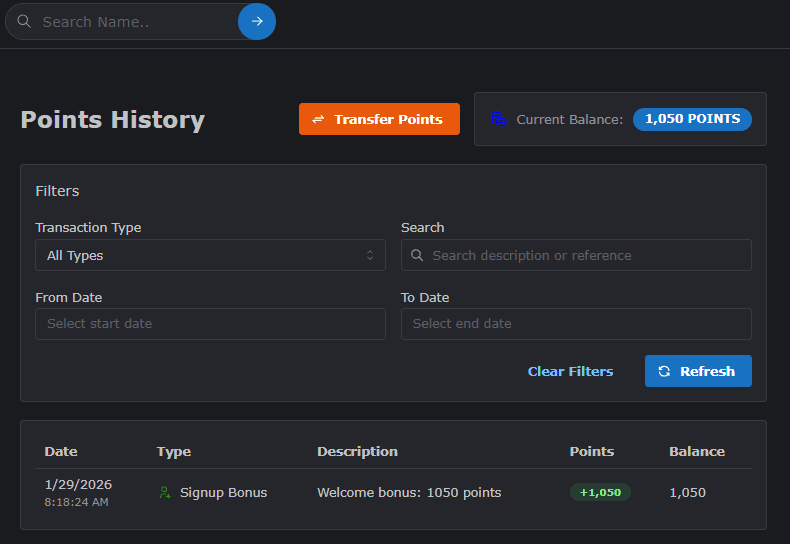
Every time you earn or spend points, a record is created in your history. This allows you to maintain a clear audit trail of your digital currency.
How to View History
- Navigate to your Points Dashboard.
- Click on the History or Transaction Log section.
- View the list of all activities with timestamps, descriptions, and point amounts.
Transferring Points
You can transfer your ODude Points to any other user who has an active ODude Name.
Steps to Transfer
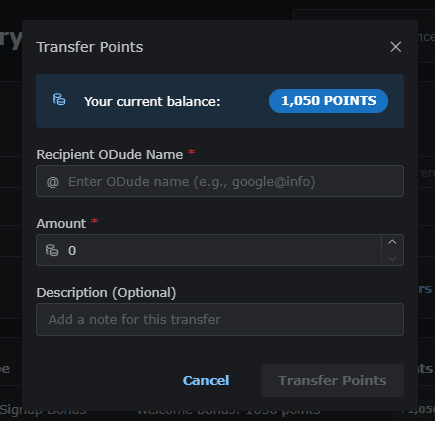
- On your Points dashboard, locate and click the Transfer Points button.
- Enter the Recipient’s ODude Name (e.g.,
friend@odude). - Enter the Amount of points you wish to transfer.
- (Optional) Add a note for the recipient.
- Click Confirm Transfer to complete the transaction.
Note: Points can only be transferred to active ODude Name accounts. Always double-check the recipient’s name before confirming.
Last updated on