Creating a Product
Listing a new product on the Odude Marketplace is straightforward. This guide explains all the fields required and how your product will be presented to potential buyers.
Product Fields
When creating a new listing, you will encounter the following fields:
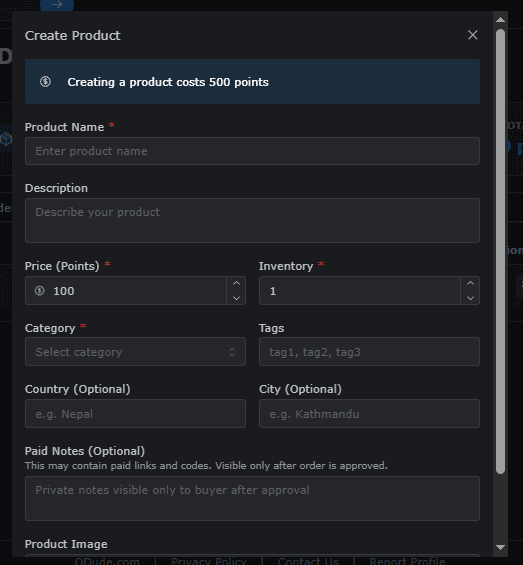
1. Title
The name of your product. This should be clear and descriptive to attract buyers.
2. Description
Explain what your product is, what is included, and any special instructions for the buyer. You can use markdown to format this text.
3. Price
Set the price for your product. Ensure it reflects the value of the digital asset.
4. Category
Choose the most relevant category to help buyers find your product through filters.
5. Media/Images
Upload high-quality images or videos that showcase your product. First image usually serves as the cover.
6. Digital File/URL
Provide the actual digital asset or a secure link where the buyer can access the product after purchase.
How it looks to End Users
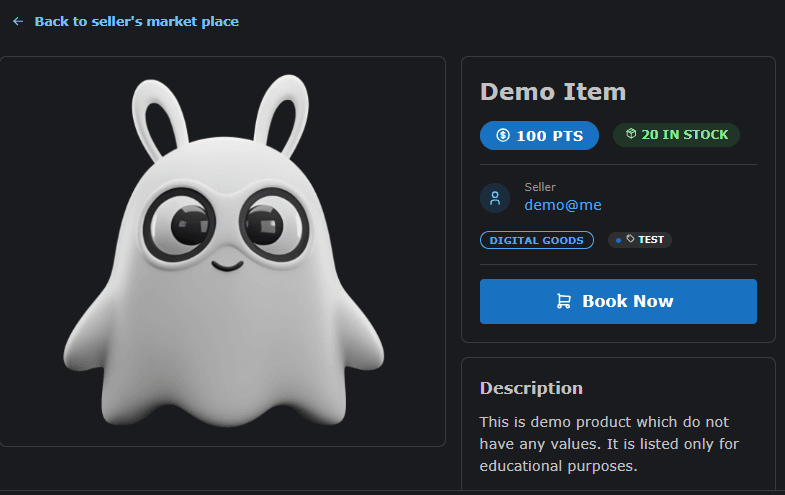
Once your product is published, it is assigned a unique URL. This page is optimized for conversion, clearly displaying all relevant information to the buyer.
Example Product Page
You can see a live example of a product page here: View Example Product
Key features of the public product page:
- Prominent Buy Button: Makes it easy for users to initiate a purchase.
- Product Gallery: Sliders or grids to view multiple images of the asset.
- Seller Profile: Links to your Odude profile so buyers can see your reputation.
- Detailed Description: All the info you provided in the creation step, formatted for readability.
Requirements
To create a product, you must:
- Have a verified Odude account.
- Have a valid payment method linked (if applicable for payouts).
- Ensure your digital asset complies with our terms of service.