Managing Your Names
Once you have registered an Odude Name, you can manage it through the My Names dashboard. This guide explains how to update your profile records, transfer your name to someone else, or delete it.
Updating Profile Records
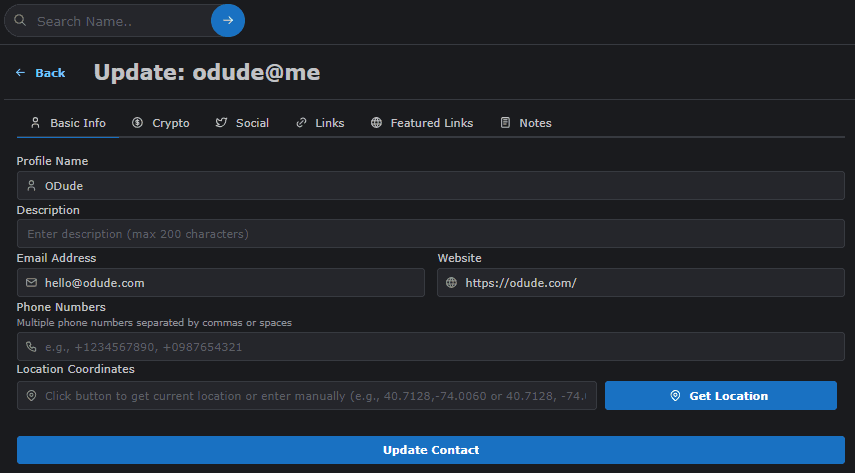
Your Odude Name acts as a container for various records. You can update these at any time to keep your profile current.
- Select the name you want to edit from your list.
- Click on the Update Record button.
- Update fields such as:
- Display Name: Your preferred public name.
- Description/Bio: A short intro about yourself.
- Avatar: A URL to your profile picture.
- Social Links: Links to your Twitter, GitHub, Website, etc.
- Click Update Contact.
Transferring Ownership
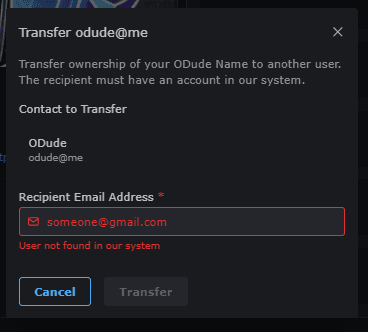
You can securely transfer ownership of an Odude Name to another user’s address.
Warning: This action is irreversible once confirmed. The name will no longer be under your control.
- Navigate to the Transfer button within the management page for your name.
- Enter the recipient’s email address used during signup. The email must be registered with Odude.
- Review the details and click Confirm Transfer.
Deleting a Name
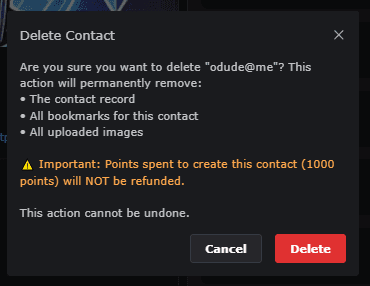
If you no longer wish to keep a name, you can delete it. This will release the name back into the public pool for others to register.
- Navigate to the Name Controls for your name.
- Find the Delete Name button and click it.
- Click delete name button to confirm deletion.
Need Help?
If you encounter any issues while managing your name, please contact our Support Team or join our community Discord.
Last updated on