Manage Credits
Managing your ODude Credits is simple and transparent. You can track every transaction and easily share credits with other users in the ecosystem.
Credit History
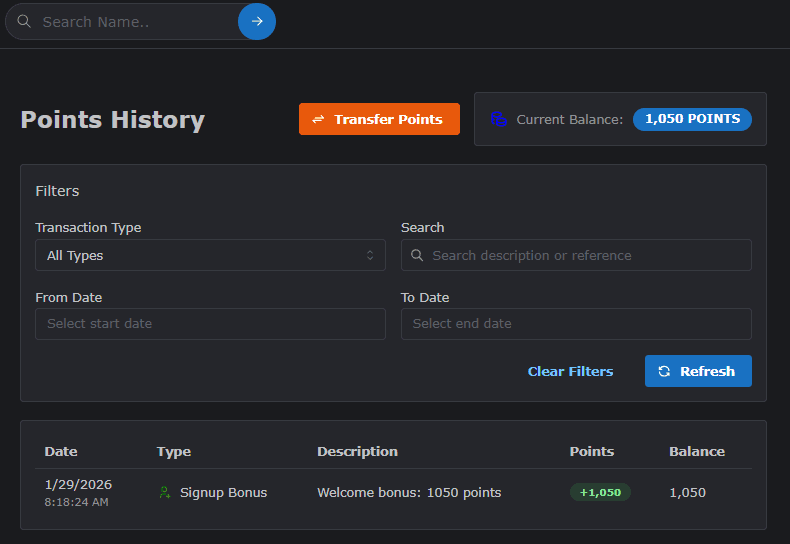
Every time you earn or spend credits, a record is created in your history. This allows you to maintain a clear audit trail of your digital currency.
How to View History
- Navigate to your Credits Dashboard.
- Click on the History or Transaction Log section.
- View the list of all activities with timestamps, descriptions, and credit amounts.
Transferring Credits
You can transfer your ODude Credits to any other user who has an active ODude Name.
Steps to Transfer
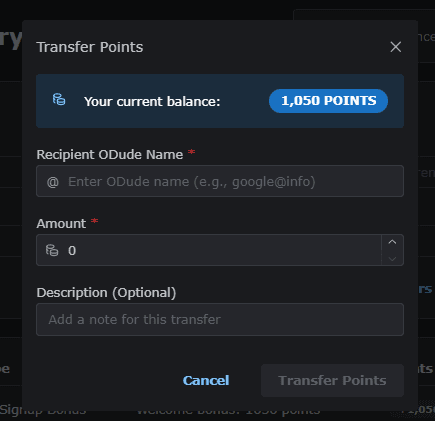
- On your Credits dashboard, locate and click the Transfer Credits button.
- Enter the Recipient’s ODude Name (e.g.,
friend@odude). - Enter the Amount of credits you wish to transfer.
- (Optional) Add a note for the recipient.
- Click Confirm Transfer to complete the transaction.
Note: Credits can only be transferred to active ODude Name accounts. Always double-check the recipient’s name before confirming.
Last updated on