Transaction History
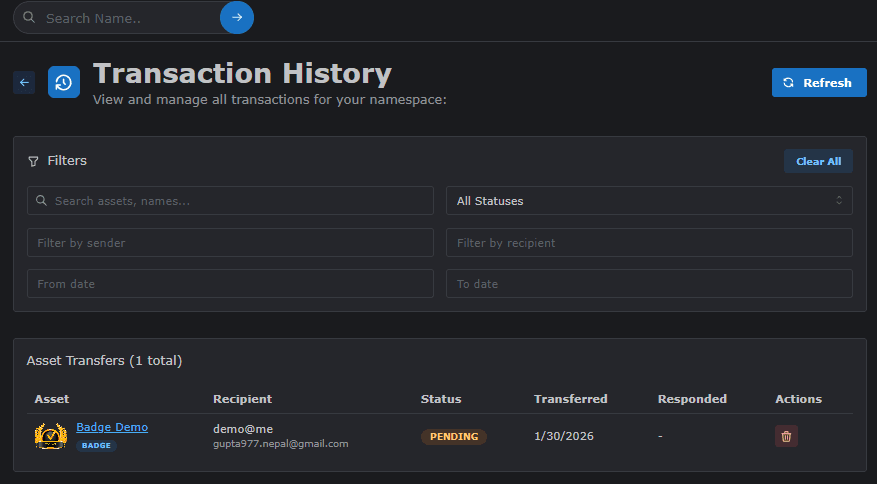
The Transaction History page (name.odude.com/owner/transaction) provides a detailed log of every asset issuance and transfer initiated from your owner account. It is the primary tool for auditing and managing the distribution of your assets.
Search and Filtering
Managing a large number of transactions is made easy with robust tools:
- Search: Search for specific transactions by Recipient Name or Asset Title.
- Filters: Filter the history by Asset Type (Badge, Certificate, etc.) or by the Status of the transfer.
Transfer Statuses
Each transaction in your history will have a specific status indicating its current state:
| Status | Meaning |
|---|---|
| Pending | The asset has been sent but the recipient has not yet taken action. |
| Approved | The recipient has accepted the asset and it is now on their profile. |
| Declined | The recipient has rejected the asset. |
| Revoked | The owner has cancelled the transfer before it was accepted or pulled it back. |
Revoking a Transfer
If you have issued an asset by mistake or need to cancel a pending issuance, you can use the Revoke feature.
- How to: Locate the transaction in the list (usually in Pending status) and click the Revoke button.
- Effect: The asset will be removed from the recipient’s Pending list and they will no longer be able to accept it.
Last updated on