Owner Dashboard
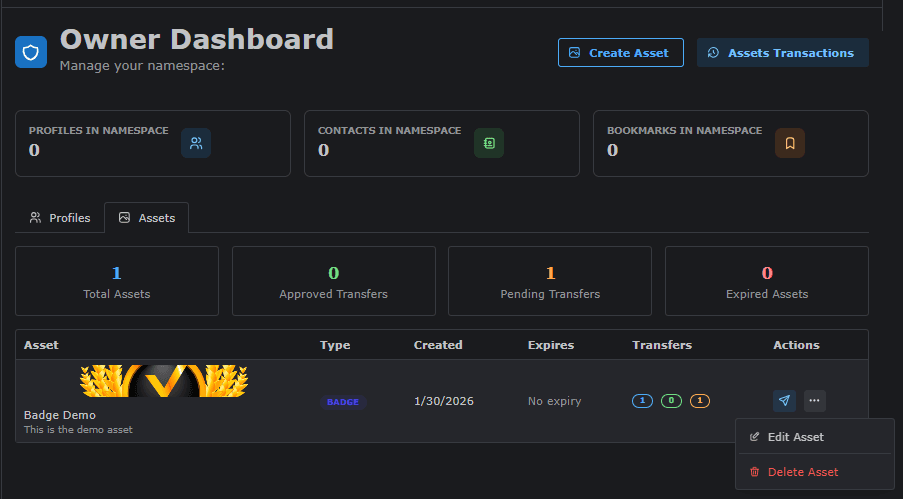
The Owner Dashboard (name.odude.com/owner) is a specialized interface for users authorized to issue and manage assets at scale.
Access Note: This dashboard is only visible and accessible to users who have been granted Special Rights by the platform administrator. If you do not have these rights, the page will not be accessible.
Dashboard Overview
The dashboard is split into two primary sections to manage your identity as an issuer and your assets.
Profile Tab
In this tab, you manage your “Issuer Identity.” This is how you appear to users when they receive an asset from you.
- Brand Identity: Set your issuer name, logo, and description.
- Verification: Display your official status to build trust with asset recipients.
Assets Tab
This is the command center for asset creation and issuance.
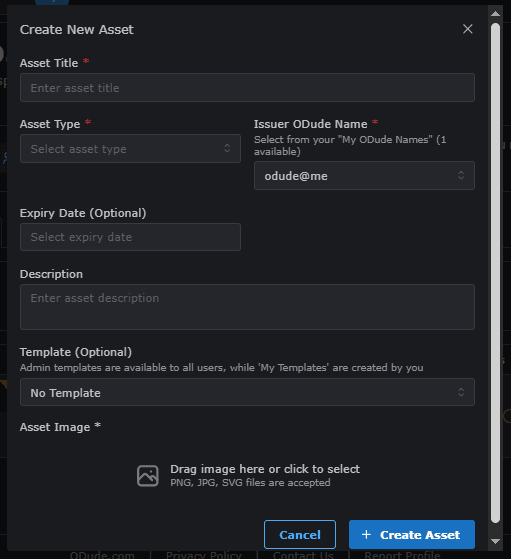
How to Create an Asset
- Define Properties: Click the “Create New Asset” button. You will need to provide a title, description, and upload the asset image (e.g., the badge icon or certificate design).
- Select Type: Choose from the available types: Badge, Certificate, Ticket, or Coupon.
- Set Attributes: Add specific metadata like “Expiry Date” for certificates or “Redemption Value” for coupons.
- Confirm and Mint: Review the details and the associated cost before finalizing.
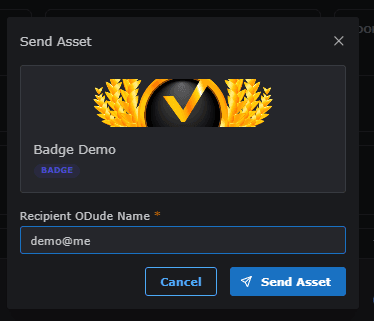
Issue Asset
Once an asset is created, you can distribute it to specific Odude Names.
- Individual Issue: Enter a single Odude Name to send the asset.
Last updated on